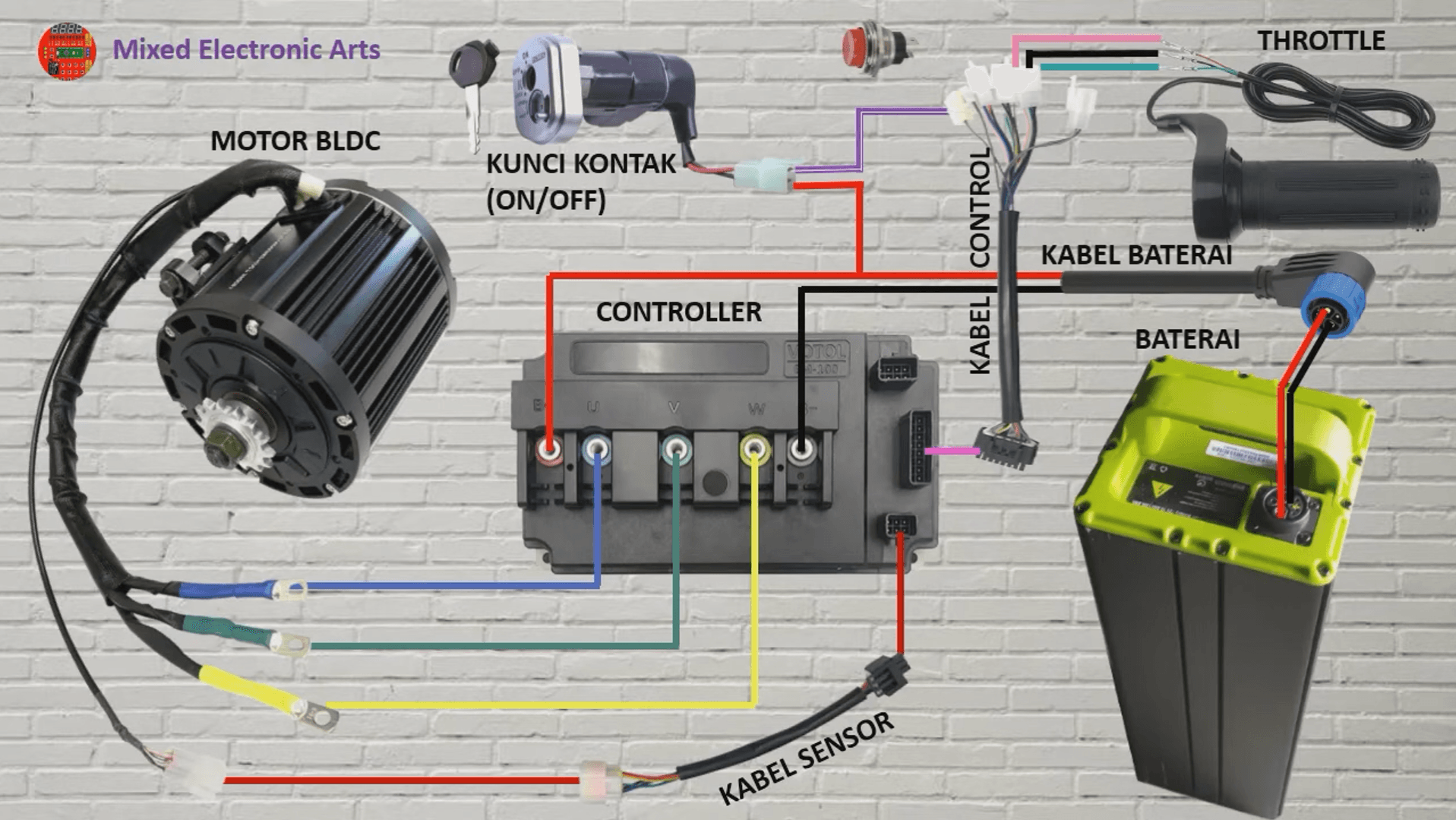
To wire an electric vehicle using the Votol EM 100 controller with a BLDC QS 4kW motor and a 72V/40Ah battery, start by connecting the battery to the controller, ensuring correct polarity. Then, connect the motor's phase wires to the controller, and attach the throttle and any necessary sensors according to the wiring diagram specific to the Votol EM 100. Step-by-Step Wiring Guide
Connect the Battery to the Controller
Ensure the battery is fully charged.
Connect the positive terminal of the 72V battery to the positive input of the Votol EM 100 controller.
Connect the negative terminal of the battery to the negative input of the controller.
Connect the Motor to the Controller
Identify the three phase wires from the BLDC QS 4kW motor (usually labeled U, V, W).
Connect these phase wires to the corresponding outputs on the Votol EM 100 controller.
Throttle Connection
Locate the throttle connector on the controller.
Connect the throttle wire from the throttle grip to the controller, ensuring the correct orientation (usually color-coded).
Sensor Connections
If your setup includes sensors (like a speed sensor), connect them according to the wiring diagram provided with the Votol EM 100 controller.
Ensure that any signal wires are connected to the appropriate pins on the controller.
Final Checks
Double-check all connections for correct polarity and secure fittings.
Ensure that there are no exposed wires that could cause short circuits.
Testing the Setup
Power On
Once all connections are secure, power on the battery.
Check for any error codes on the controller display (if available).
Functionality Test
Gradually apply throttle to test the motor's response.
Monitor the system for any unusual sounds or behaviors.
Safety Precautions
Always wear safety gear when working with electrical components.
Ensure the vehicle is on a stable surface during testing.
Disconnect the battery before making any adjustments to the wiring.